

All good now. Took it to Canada computers service and the problem was the SSD storage was heating up too much and when that happens there's a protection that shuts it down and when that happens Salamandra suddenly has no access to the stored files and it crashes and the audio goes crazy like a broken record and windows shuts down and no controls work. I didn't know that holding down the power key for 30 seconds would command it to shut down and not just wait for the battery to run out.
The solution: Take off the little access cover over the SSD and leave it open. I also took off the bottom cover and found from manufacture tape over the bottom vent on the inside!! Huh? Took that off and also drilled 9 holes in the bottom cover 1/8" for better ventilation.
Now works continuously as it should.

Well that's good news I guess, it just wasn't getting enough ventilation huh? I suspect those super compact laptops aren't really intended for constant use. So even if you had contacted the seller about the problem, it doesn't sound like the unit itself was flawed, it's simply not meant to be used as a primary computer, but rather as a pocket accessory used on the fly as a convenience item.
But still, Im surprised you took it straight to a local repair shop before at least contacting the seller about it overheating first. Personally, that would have been the first thing I did. In fact I probably would have request a return and refund. I'm not keen on receiving a brand new item and bringing it directly to a repair shop.
But sounds like it all worked out in the end, which is great. Glad to hear it. So is the pocket PC now your primary for station automation?
All good now. Took it to Canada computers service and the problem was the SSD storage was heating up too much ....
Now works continuously as it should.
I was wanting to take a look at that laptop again but I cant find that thread again. I did find where you first mentioned it here: https://www.part15.org/community/everything-else/latest-version-of-salamandra/#post-62576 but it seems there still other thread where you had actually posted images of it and the link, but can't find it again.
If you go to Ali Express and search mini laptop you will come up with many of them from several sellers and different prices. Also Amazon has them too search mini laptop but more expensive on Amazon but the advantage is with Amazon if a problem you just return and get another. Amazon pays for the return and will even come and pick it up! With Ali Express it's not quite as easy. You hope with them that what you get is good as it's not that easy to return and deal with these sellers and the customer has to pay the cost of shipping. It was much easier than trying to communicate with a seller in China to just have the tech at the service dept here take a look. Now you know. That small size and giving you the performance it does doesn't leave much for adequate cooling. It was actually the SSD storage that was the problem but solved when taking off the cover and just operating it like that. Why that tape was over the bottom vent on the inside is a mystery to me. Did see on a youtube video of another person that took one of these apart(tear down) and the same thing.....tape over the bottom cooling vent. When the service person at Canada Computers did the diagnostic after getting what I was getting at home operating with Salamandra he said it was the SSD overheating and I suggested then to just take the cover off and then....worked fine, no shutting down so it works with the cover off and I added to it myself with the 9 holes drilled in the bottom for more ventilation.
Yes this is my go to for the broadcast computer and the other two put away for back up. They are the 10" ones. After all this is why I got this little one.
Yes I agree with you(Rich) that some of these and other computers are not made with our application of a continuous broadcast automation in mind.
I remember you said it was about $300... Ok, 7" laptop on Aliexpress, has to be!one these. I'm surprised it's free shipping. I'm not thinking of getting one or anything, not particularly, I just think they're pretty cool and handy in various situations, and the price seems a welcoming enough. I question (not that I would know, but I ponder how reliable it would be to run Salamandra 24/7 even with your modifications to improve ventilation. I know next to none about SSD lifespans or anything, or if one brand runs hotter than another - Don't know anything about that - I'm just curious if that little $300 pc is capable of surviving 24/7 use, even lightweight low process music automation software.
I'm not trying to be negative, I think it's cool as can be and how your using it is as cool as can be too. The only thing not cool is your SSD!
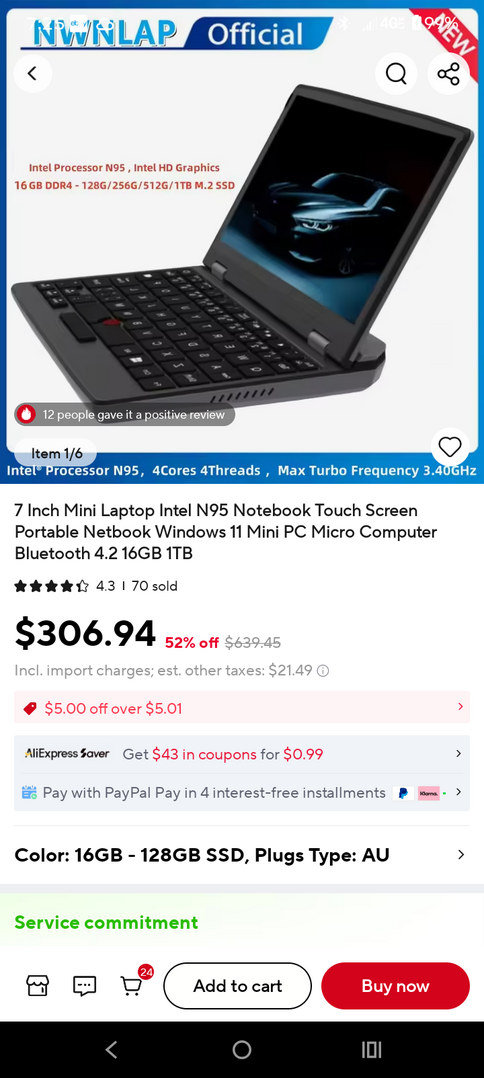
Oh by the way, care to say how much the repair shop charged you?
Also curious how much less watts you use.
@richpowers You see the one you posted? Look at what the performance is. An N95 processor and 16 gigs of RAM. That processor is much better than what comes in an entry level laptop and so is the 16GB RAM. But that N95 processor also uses more power and makes more heat and needs more cooling. Here is the difference between a typical Celeron and the N95 in these little computers. Notice the power consumption and heat difference.
This is what the problem is. These mini laptops should have a Celeron that would be good enough. Yes it should be able to run continuously with better cooling(I'll find out but so far so good)
The processor in these mini ones use 15 watts of power at full throttle where a Celeron uses 6 watts.
With this little computer when charged and screen off plus the Cuthbert and the Procaster all in operation the Bluetti shows 5 watts power consumption. If the screen goes on the power used goes up to 8 watts and if charging 11 watts. I have the screen timed to go off in 5 minutes of inactivity.
Canada Computers charged me $40 for the diagnosis and he had it for two weeks to make sure it wasn't shutting down or crashing after removing the SSD cover. Fortunately just running Salamandra isn't making the N95 work very hard and is not needing the 16GB of ram.
From AI:
Intel Processor N95 (2023) is significantly faster and more capable than the Celeron J4025 (2019), offering over 3x higher benchmark performance. The N95 features 4 cores/4 threads (Alder Lake-N), faster RAM support (4800 MHz), and better graphics (16 EUs), making it ideal for budget mini-PCs, while the J4025 is a 2-core dual-core chip better suited for ultra-low-power, basic tasks.
- Performance: The N95 is vastly superior, with up to 3.64x higher PassMark scores. It handles 4K video and multitasking much better than the dual-core J4025.
- Architecture & Process: N95 uses modern 10nm (Intel 7) architecture, while the J4025 uses older 14nm.
- Cores/Threads: N95 has 4 cores/4 threads; J4025 has 2 cores/2 threads.
- Graphics & Memory: N95 supports faster DDR5/DDR4 4800MHz memory and has better integrated Xe-architecture graphics compared to the J4025's limited UHD 600.
- Power Consumption: J4025 has a lower 10W TDP (often 6W), making it slightly more power-efficient, while N95 runs at 15W, requiring better cooling.

Did the SSD have a heat sink on it? When I tore apart my troublesome laptop to get parts, the SSD chips were just bare, and then you are dependent on air flow. If you get some thermal double-sided tape and a metal heat sink, and install it over the chips (I'm sure you can get them on Amazon or Ali), you'd be even safer. I have a desktop board that allows me to install NVME SSD's, and it came with such a heat sink - it works well. The better, name brand SSD's also likely come with a heat sink as well.
@mark But I notice the N95 models are by far the most inexpensive laptops the have up there, I don't see none of the less fast but more efficient Celeron processor models up there, at least not in that price range. It would be nice if there were, and they'd probably be even cheaper because of it. It would also seem to make more sense, I can't imagine what applications you might use on something like that which would require all that extra unnecessary horsepower. No one would ever use a 7" laptop for high processing purposes.
But I don't know, I'm just speculating, but it seems to me that, like you said, the little laptop is much better suited for a Celeron because it would be just as capable without any overheating problems.
Did the SSD have a heat sink on it? When I tore apart my troublesome laptop to get parts, the SSD chips were just bare, and then you are dependent on air flow. If you get some thermal double-sided tape and a metal heat sink, and install it over the chips (I'm sure you can get them on Amazon or Ali), you'd be even safer. I have a desktop board that allows me to install NVME SSD's, and it came with such a heat sink - it works well. The better, name brand SSD's also likely come with a heat sink as well.
I'm not particularly familiar with SSDs, but if heat is a common problem then I don't understand why heat sinks are not standard for SSDs like it is for the processors - I've never seen a processor without a heat sink on it.
It should be standard. Saves the manufacturers a few pennies, I guess.
@artisan-radio No the SSD has no heat sink but leaving the little compartment open solved the problem. Running good 24/7 since last Thursday and fine, also removing that stupid tape over the bottom air vent on the inside and drilling 9 holes for ventilation in the bottom cover after removing. Knock on wood!
@richpowers Yes, exactly. They want to I think put as good performance as they can in these little things to make it more attractive to buy. But SSD's do heat up with operation also and if you have an external one for back up storage and you transfer files to and from it you will feel it warms up in operation.
@mark This made me think about this thread..
Netflix is my new no-lie laptop battery test
Those Snapdragon processors only come with higher end android tablets not PCs that I have seen.
The little laptop is running flawlessly 24/7 and has not shut down since the mods to better the cooling.