

Nothing I installed worked on Windows 2000 I just got a copy of XP and now I am installing it. Computer should be fully running Zara late tonight or tomorrow.
Stream is back up had a little trouble setting up the computer for Zararadio. Check out the stream http://phatbeatsradio.tumblr.com hope Zararadio does not any time soon. One thing I do like about Zaradio is it is kinda hard to set a even to start at lets say 10:30 or 12:30 it is real easy to start a event at the top of a hour.
You can start it at any specific time you want, check pages 8 and 9 of the manual... If you have no idea at all how to use Zara then maybe this super basic starter guide will help famaliarize you with it http://part15lab.blogspot.com/2014/06/zara-radio-for-dummies.html
example

Is there a way to run a event every 30 min with Zara??
Sure. Just use the scheduler and set the file name and time to run the event file.
This does not change the programmed playlist rather it inserts the event into the playout. When finished it returns to the playlist.
To play every 30 minutes would require two scheduled events at 30 minutes apart.
I am asking how to set a event to run every 30min this is not a time or temp annoucment.
Yes, the scheduler let's you play lists, rotations, steams, random files, files, et all, not just TTH announcements.
Are you not sure how to find/use the scheduler?
I know how to set events I just do not know how to set a event that plays every 30min. With Radioboss you get more control when setting events. Zararadio events is verry limited compared to Radioboss. Here is a shot of Radioboss events 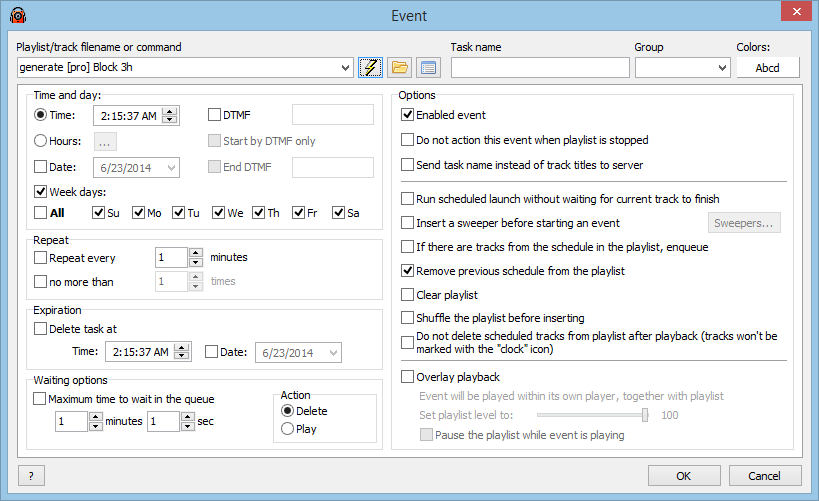 Zararadio has no repeat fuction in event settings.
I could set this event to play once a hr then I could set 24 more events to play at every 30min. Having to many event scheduled might crash the program.
An event in Zara defaults to once per day, 7 days per week. But if you select "other hours" you can make it run Every hour at the time set. To go every 30 minutes do the same but create two events with start times set 30 minutes apart.
If the events must go at exactly 30 minutes apart then select "immediate" play. Otherwise you can delay the event for a set time to let the currently playing file finish.
If the delay times out because the currently playing file is longer, the event will expire.
mram1500 I thank you I got Zara to play a station ID every 30 min. I also got the 2 time a day week days news and 15 radio programs a week set I am now 101% ready to go. Audio sound pretty good I have the computer playing through old Kenwood KR-7400 stereo reciver hooked up to Polk Audio monitor series 2 speakers. I hope Zararadio does not crash every 20 to 22 hrs like it did on Windows 7.
I think it unlikely that having a lot of scheduled events would ever cause a crash of the program. Just do it like Mram suggested; scedule the event at the top of the hour, then schedule the same event at the 30 minute mark. Your event will now play every 30 minutes.
Zaradio is still having problem it is taking for every to load large playlist and it still freezing at the 20 to 21 hr mark. Zararadio was not designed to run a playlist bigger than 750 to 1k tracks. Zararadio 1.4.4 and 1.6.2 both habing these problems. Time to finda another radio automation program.
DJboutit there is something I notice about you.
If software doesn't work the way you think it should right away and without delay, you cut it off and move on.
You believe your first conclusion, which is always that "this software doesn't work".
But I am telling you that Zara may not be the problem.
We all have had very smooth results with Zara.
Your problems are different than anyone else has experienced.
What I suspect and what I think you should consider is that...
SOMETHING ELSE IS WRONG! IT MAY NOT BE ZARA!
I don't know what the real problem is with your computer setup, but I think you need to at least look for SOME OTHER PROBLEM and not Zara.
I hope my stern words get you to look again for underlying problems which may eventually solve the puzzle.
I've used Zara 1.4.4, 1.6 (on Windows 2000 & XP) and the latest, 1.6.2 (on Vista). Absolutely no problems, even with playlists of over 10,000 songs and pages of events.
I agree with Carl - something else is wrong.
Here's what I believe you should do:
- Post a complete list of your hardware configuration, memory, network configuration, etc.
- Post a complete list of software you're running, including O/S, other software in the system, including anti-virus. Please be precise, such as is your Windows 2000 Professional or Server or Advanced Server?
From that, people here may be able to give you suggestions where to look. It's going to be a matter of whittling down your hardware/software to the bare minimum to isolate where the problem is.
Off the top of my head, I'd say to first get another copy of Zara, as yours could be corrupt.
I'd then run a virus scan to make sure you're OK and then disable your anti-virus. Sometimes those programs can interfere with others on your system.
I would uninstall everything off your computer except Zara and leave only what you need to run Zara.
That would be a start - with more tweaking to come once we know your configuration.
If you don't do this (your choice, obviously), you run the risk of having the same sort of problems with other software, including alternative radio automation.