

Those that have followed my posts about SDR's in the past know that I've managed to get server/browser-based SDR software running with a simple SDR, the RTL-SDR V4 Blog. Results with FM are OK, with an AM signal not so great.
There are two big problems. First, the receiver gets overloaded on both AM & FM very easily, so that even a low power BETS/|RSS-210 signal completely wipes out everything else across the band.
Secondly, there is an issue with AM reception - on quiet passages, the noise level jumps dramatically, making listening uncomfortable. I had thought at first that this was a software glitch with the AGC, but it turns out that the same behavior appears using the RTL-SDR with other non-server receiving software (such as SDR++).
I've been playing around with an SDRPlay RSP1A, but unfortunately, it turned out to be a clone (which I was not aware of), which the SDRPlay drivers/software recognizes and quit after using it once (they're not open source but proprietary). However, I was able to use it on AM that first time on several computers, and the noise problem is not there. It also doesn't suffer from signal overload nearly as much. So I'm going to purchase a 'real' RSP1A for the SDR, which should clean up both problems.
An added benefit of the SDRPlay is that it can cover more of the FM band than the RTL-SDR (10Mhz rather than 2Mhz). That added coverage doesn't matter all that much for the AM band, of course.
I also own a Hack RF that I'm going to try next. It is open source, so there should not be any problems with drivers and proprietary software. OpenWebRX+ (the software I use) doesn't support it, but other software does, so we'll see where that goes. Probably not anywhere I want to go.
One thing I noted. AM on the Talking Sign, listening with the SDRPlay, sounds fantastic, particularly with a wide bandwidth (11K). In fact, the sound rivals my mono FM signal. There is a noticeable difference in the highs when I use the 6K or 8K bandwidths on AM. I had noted in the past that the quality of my over-the-air AM signal depended almost entirely on the radio I was listening to. With my SuperRadio clone, and the Wide bandwidth, it sounds great. With others, it still sounds good, but the highs are just not captured (although they are obviously there and being transmitted).
That's it for now. I'll probably hold off putting the SDR back online until I get the SDRPlay.
As an addendum, while searching for information on using the Hack RF with OpenWebRX+, I ran across this documentation on the project.
Greatly improved, it identifies a lot of shortcomings when I was attempting to install the software, including persistance of docker volumes. I obviously was too close to the 'bleeding edge' when I did it. It still has errors, however, as it clearly states that the docker images will not run on Windows - my installation begs to differ.
The developer states that Windows does not allow direct USB access to WSL & Docker. That is true. However, it does not note that the open source program USBIPD does, and that's how I was able to get things going.
Oh well, maybe in the next iteration of the documentation.
And these Linux/Unix guys still must think that if a program is difficult to write, it should be difficult to understand.

I'm always confused over the SDR AM and FM things your doing.. I mean I think it's cool and I've listened to it here and again when you had it online, but really don't understand what's going on.. Is the SDR only receivable via software on a computer or are there actually SDR receivers on the market? Is SDR a form of digital transmission that some stations want to switch to?
I guess I'm asking who is the audience? Are there other options to tune in other than in your webpage when you have it online?? If it can be received offline, what's the range?
An SDR (Software Defined Receiver) is just a radio (i.e., a piece of hardware) that is controlled primarily by software, usually a computer program, rather than exclusively electronics. This has many advantages, not the least of which that you can add radio functionality or change it with a software upgrade, such as adding modes (particularly digital ones).
The SDR software will usually tell the SDR to receive all signals in a range of frequencies. The SDR will send that data back to the computer via a USB interface. The software can then tune in to a particular frequency, decode that data and generate audio. It can also display the data from the entire frequency range and the signals received in the form of a spectrum display, or waterfall.
There are several types of SDR software 'out there'. I call one type single user. The SDR is connected to that user's computer, and software is run on the computer to control that SDR. All functions are performed on that computer. Good examples of this kind of software are SDR# and SDRuno.
Then there are the server/client ones, and they are more powerful and flexible. The SDR is hooked up to one computer, and server software is run to gather the data.
The model used by programs such as SDR++ sends that data to a client computer, either on the same local network or over the Internet. Software on the client computer then decodes the data and does its thing. The disadvantage of this model is that there is a lot of data to send. The absolute minimum for sampling of 250Kbps and 8 bit samples is about 7 MBb/s and it can easily hit well over 50 MBb/s by increasing the sampling rate and size. That might work over local networks, but not the Internet.
The model used by OpenWebRX+, which I managed to install, is quite different. All data is collected AND PROCESSED on the server. The client software, which is browser-based, sends control commands to the server, which sends them along to the SDR. The server sends back visual and audio data only to the client (browser).
Currently, I use an SDR called RTL-SDR V4, which can monitor a frequency range of maximum 2Mhz. In the AM mode, data rates including audio are approximately 100Kb/s, and for WFM, around 150Kb/s. Not much more than the usual 64-128Kbps for ordinary streaming.
There are some restrictions. No stereo for FM. Visual traffic takes up more bandwidth usually than audio, and there is no way to turn off (at least with the version I have) the data waterfall, which takes up most of it.
The SDRPlay SDR, which I am getting soon, can monitor up to 10Mhz of radio spectrum at lower resolution, and 6Mhz at full. So the data rates will grow for OpenWebRX+ if I end up using this superior radio, but they won't even approach those of, say, SDR++.
As I've stated previously, the SDRPlay appears to have better hardware filtering (you can only do so much in software) and it also doesn't appear to have the same AM AGC issue that the RTL-SDR V4 has.
I guess I didn't answer all your questions.
The browser-based SDR software that I put up online displays visually and presents in audio the over-the-air signals of my AM and FM transmitters. If you were close enough to my location, you could listen in to those transmitters using an ordinary radio. You'd have to be pretty close.
The SDR effectively extends the range of those signals. You connect via the Internet to the SDR software, and control the local SDR via commands to listen to any radio station within the displayed frequency range. You're effectively listening in to a radio located in my studio.
Once I get the SDRPlay up and running, there will be a 10Mhz segment of the FM band available, so you would not only be able to hear Artisan Radio, but any other local FM radio station. The entire AM band will be covered in the SDR as well.
Visual traffic takes up more bandwidth usually than audio, and there is no way to turn off (at least with the version I have) the data waterfall, which takes up most of it. ... ..
The browser-based SDR software that I put up online displays visually and presents in audio the over-the-air signals of my AM and FM transmitters. If you were close enough to my location, you could listen in to those transmitters using an ordinary radio. You'd have to be pretty close.
The SDR effectively extends the range of those signals. .. .. You're effectively listening in to a radio located in my studio. .. ..
I'm not surprised the visuals take more bandwidth than the audio but not having an option to turn it off (to conserve data) just seems wrong.
I really like that the audio heard on the SDR player is not originating directly from your pc soundcard but is actually the audio coming from your transmitters (have I got this right?), so what's heard on the SDR is essentially what your own radio locally would hear from your transmitter.
But is SDR exclusive to the Internet? does it have any free-radiate uses?
Yes, you are hearing what is coming from the transmitters on the SDR feed. That's why I want to try using the SDRPlay instead of the RTL-SDR, as it handles the AM broadcast band signals a lot better. The RTL-SDR was designed primarily for VHF use (which includes the FM broadcast band).
I do have an SDR that can also transmit in low power (a few milliwatts) - the Hack RF. It obviously is not certified for Part 15 over-the-air use, and is meant more for Ham Radio operators. But it could, at least in the U.S., be used for AM transmission, and, throttled down, maybe FM if you're careful. There are software packages that control the transmission functions (GNU Radio, for one) but I haven't tried them out. I'm having enough trouble getting the receive functions on the SDR's working properly.
I also agree that not having an option to turn off some of the graphical displays in the SDR browser feed is a huge omission. If I ever get up sufficient motivation, I'm going to grab the sources and make the necessary changes to the user interface. Those would be easy. It's actually learning where all the code is, setting up the necessary build environment and then building the package that's the difficult part.
When I modified the open source JMPX program (it generates RDS for an FM signal), it took maybe half an hour to make source code changes. It took days to figure out exactly where to make the changes, and then to put together the build environment. Unfortunately, open source software doesn't tend to be well documented, and a lot of assumptions are made in the documentation that does exist about the knowledge of the developer.
I'd also like to port the software to native Windows, as running it within Docker is just a hack.
@artisan-radio You mentioned: "I do have an SDR that can also transmit in low power (a few milliwatts) - the Hack RF. It obviously is not certified for Part 15 over-the-air use, and is meant more for Ham Radio operators."
Well it doesn't have to be certified does it? it's not really our concern, our sole responsibility is the compliance and presumably those "few milliwatts" it transmits is certainly within part 15 limits of whatever that frequency the SDR uses... Which circles back to the question of what kind of receiver is need to receive it over-the-air. Earlier you said you could pick it up locally if real close to the transmitter... With a standard radio? I don't get it.
"The SDR can also transmit in low-power".. well certainly it's not transmitting amplitude modulation - So what frequency the SDR transmit in?
All transmitters in Canada have to be certified, which is why I specifically stated that the Hack RF could be used to transmit in the AM broadcast band in the U.S (as there you just have to be compliant).
There does seem to be a fundamental understanding of what a software-controlled transmitter can do. Basically, the same thing that any transmitter can do, except that it is driven by software, rather than electronics. So, yes, the Hack RF can transmit in AM, FM, SSB - driven by software.
And the receiver portion receives radio signals just like any other radio. It has an antenna, hardware filters, etc. You control the frequency it receives on, the modes it receives, etc. through software.
The big advantage is that you can set them up to receive a wide range of frequencies simultaneously, and that data can be sent to the controlling software running on a computer. In that way, you can get a mini spectrum analyzer, and 'see' the various signal waveforms visually. To hear a specific signal, you have to tune to that particular frequency.
I hope that makes things clearer.
Yeah, wasn't thinking, I forgot that you must use certified equipment there - well didn't forget, it just slipped my mind.
I might explore that Hack RF thing a little, it sounds interesting. I these gadgets the same as what your talking about?
https://greatscottgadgets.com/
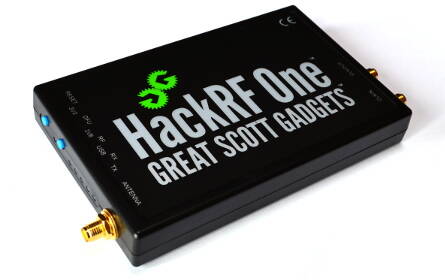
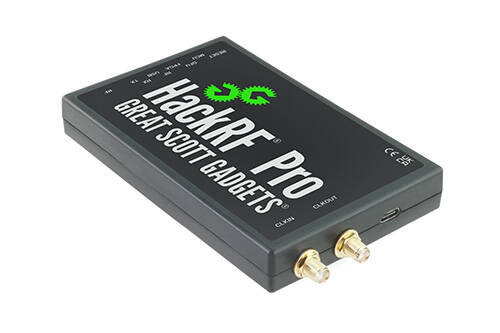
That's the one. There are many versions out there, as the design and firmware are open source. So you have tons of iterations in the market.
If you're going to play around with this device, just be forewarned that GNU Radio (which drives it) is open source, so accurate documentation is tough to come by, and it will likely take lots of experimentation (and screams of frustration) to get it going properly.
Even though there's a Windows version, Gnu Radio was originally designed for Linux (and/or Unix). There are warnings in the Wiki that you might have to compile some stuff locally, and that can be daunting (as the scripts are Linux-based). It's one of the reasons that I haven't attempted to get it working yet - I have to be in the right mood to tackle these kind of issues.
By the way, you probably know this, but you can run APRS from your smartphone - there's at least one app (I use APRSDroid, there could be others, but this one works and it was the recommended one).
You can purchase it on Google Play, and that supports the developer, but you can also download it directly from their website.
Addendum: To use APRS, you need to have your ham radio license. The APRS network generates a unique passcode based on your license. And as you stated earlier, the license is relatively easy to get these days with a basic knowledge of radio.
@artisan-radio Well I may still be misinterpreting, but it sounds like you were essentially calling the Hack RF devices a software defined part 15 transmitter, and it can broadcast AM..
I don't know what it's input to the final stage might be, but if it's under 100mw, then add an 8 foot whip and you're in compliance with 15.219 - no?
I know somethings probably wrong with that speculation, but that's all I'm doing is speculating
@richpowers Close. It's actually a software defined transmitter for a wide range of frequencies, and it has the capability of transmitting in the AM mode within the AM broadcast band. Output power is in the low milliwatts range, if I remember correctly.
It's primary purpose was to provide a QRPp (i.e., very low power) transmitter for the amateur radio bands. But it can transmit outside those bands.
I suspect that it will generate lots of harmonics and spurs, so while it might be power compliant, other factors might render it problematic for Part 15. You'd have to experiment and try it out with a spectrum analyzer. There's nothing to stop you, however, from adding an outboard attenuator and filter to bring it in line with Part 15 specs.
I believe that, in the future, these software-based radios will be the norm for most transmitters. It would be nice for a Part 15 manufacturer to investigate the possibility of using one of these as the foundation for a new transmitter. The software could actually be embedded into the transmitter itself, preventing the end user from changing important parameters, such as power. There are already amateur transceivers that do this very thing - look up uSDX and/or uSDR in any of the marketplaces and you'll see them selling for US$100 and up. Pretty inexpensive for full band radios (HF anyway) that have a variety of reception and transmission modes, including AM, CW and SSB.